Meta Quest 3 · General Aviation · Mixed Reality

Your Airspace.
Now Visible.

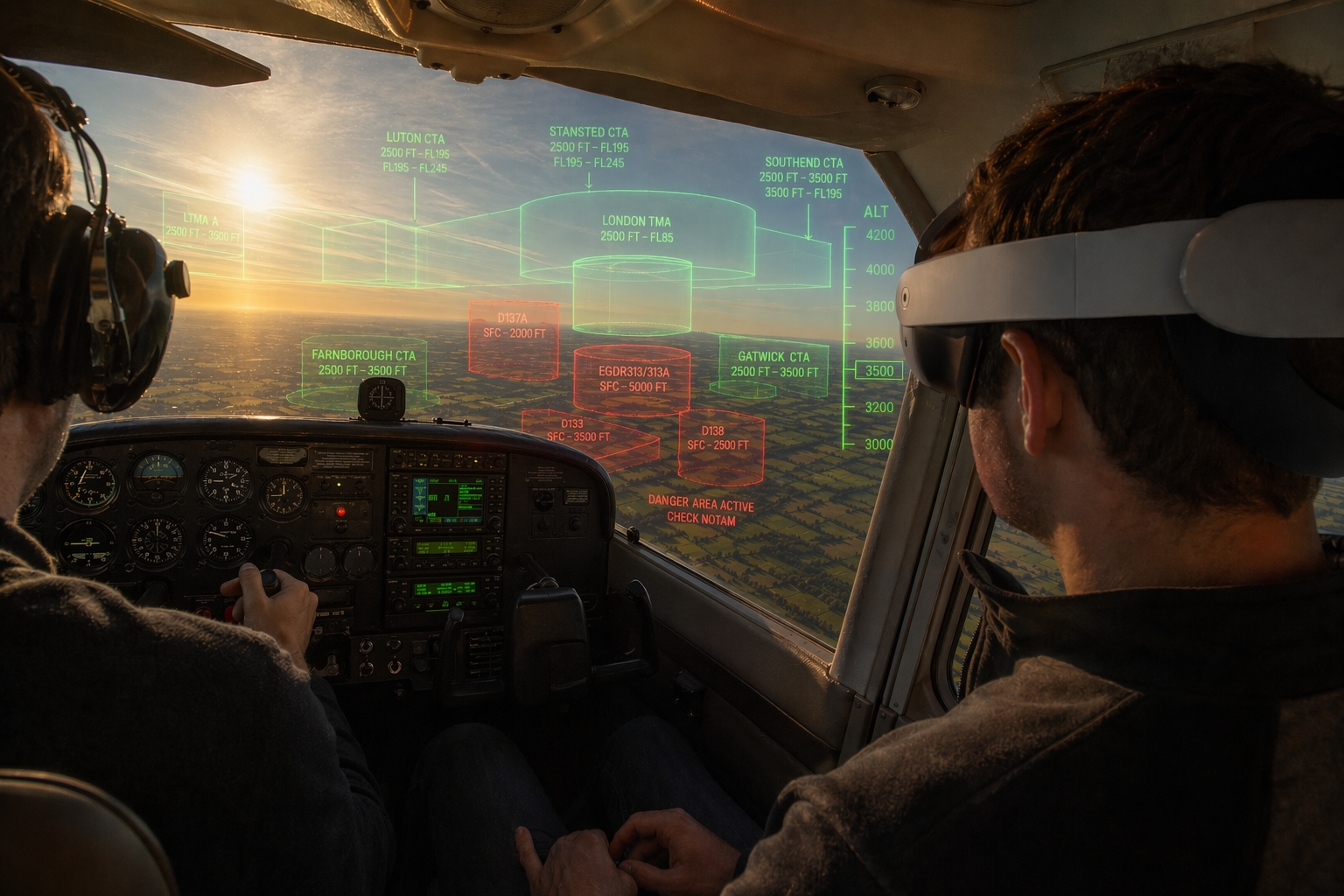
SkyWatch renders nearby aircraft directly in your field of view — real-time, color-coded, and always oriented to your position. Supplemental situational awareness, reimagined in mixed reality.

20 nm Traffic Radius
Live ADS-B Traffic
3D Mixed Reality
HDG 270°
N12345
+800 ft
4.2 nm
UAL442
+2200 ft
11.7 nm
N67890
-400 ft
6.1 nm
DAL918
+5100 ft
18.3 nm
OpenSky · 4 targets · 15s

Traffic awareness that
goes where you look.

SkyWatch is a portable supplemental traffic-awareness display for general aviation pilots. Running on Meta Quest 3, it overlays nearby aircraft as 3D markers in your real-world field of view — positioned correctly by bearing, distance, and altitude relative to your aircraft.

No panel modification. No installation. Strap on the headset, and your airspace comes alive around you.

  • Real-time aircraft data from live ADS-B sources
  • Color-coded threat assessment at a glance
  • 3D airspace explorer — fly through your traffic picture
  • No panel space, no hardwiring, no certification burden
OWNSHIP TRACKING
Position29.990 N 95.337 W
Altitude4,500 ft MSL
Ground Speed118 kt
Track270°
TRAFFIC · 4 TARGETS 1 ADVISORY
N12345 +800 ft · 4.2 nm · 124 kt
N67890 -400 ft · 6.1 nm · 098 kt
UAL442 +2200 ft · 11.7 nm · 430 kt
DAL918 +5100 ft · 18.3 nm · 460 kt

Everything you need to see the picture.

Built for the realities of a GA cockpit — quick to put on, easy to read, and designed around the way pilots actually scan for traffic.

Bearings-First Display

Aircraft markers are positioned in true 3D space relative to your ownship — correct bearing, range, and vertical separation rendered directly in mixed reality. Look toward traffic to see it.

Threat-Coded Colors

Green, amber, and red markers instantly communicate threat level — configurable thresholds based on range, altitude separation, convergence rate, and data freshness.

Rich Target Labels

Each aircraft shows callsign, altitude, relative altitude, distance, ground speed, heading, and route info. Point your controller to expand the full 6-line detail panel.

3D Airspace Explorer

Use Quest controllers to fly freely through a compressed 3D replica of your airspace. Climb above the traffic layer, orbit targets, and understand the full picture spatially.

Live Terrain Map

A real-time 3D terrain and satellite imagery layer — powered by Cesium — keeps you oriented geographically while traffic markers float at their correct altitudes above the terrain.

Compass Overlay

A persistent heading readout keeps you oriented at all times. The 20 nm visibility ring gives you an instant sense of your traffic radius in the mixed-reality scene.

Route Display

"LHR LONDON → JFK NEW YORK" — SkyWatch queries route data for identified aircraft, so you immediately know where traffic is going and why it's crossing your path.

Controller Point & Inspect

A dual-layer glowing laser pointer extends from your right controller. Aim at any aircraft marker to lock on — the full 6-line detail panel opens in place, floating next to the target, showing callsign, altitude, vertical rate, route, squawk, and ICAO hex. Point away to dismiss.

From headset to airspace in seconds.

No configuration hassle. SkyWatch is designed to be ready when you are.

01

Put on the Quest 3

SkyWatch runs in passthrough mode — you see the real cockpit and sky around you, with traffic overlaid on top. No visual isolation.

02

Connect to WiFi

SkyWatch queries the OpenSky Network (or your preferred data source) over WiFi for live ADS-B traffic data within a 20 nautical mile radius.

03

Aircraft Appear Around You

Nearby aircraft are rendered as 3D markers at their correct bearing and relative altitude. Each target updates every 15 seconds — color-coded by threat level.

04

Point to Inspect

Aim your controller at any marker to see the full detail panel — callsign, altitude, vertical rate, speed, route, and more. Everything you need to build your mental model.

Live data. Multiple sources.

SkyWatch is built on an open provider architecture — swap in live data, hardware receivers, or run offline for testing.

Live

OpenSky Network

Open-access ADS-B network with global coverage. Anonymous access included. Optional credentials for higher rate limits.

No API key required 20 nm radius
Coming

Stratux / GDL90

Connect to a Stratux ADS-B receiver over WiFi for cockpit-sourced traffic data — independent of internet connectivity.

ADS-B In hardware No internet needed
Coming

UDP JSON Ownship

Stream your GPS position from a companion app or bridge utility over WiFi — accurate ownship for correct marker placement.

Companion app Live GPS
Offline

Static / Mock Mode

Eight carefully designed traffic scenarios available offline — great for familiarization, demos, and pre-flight review.

No connectivity 8 target scenarios

Every detail, at a glance.

Each traffic marker shows a rich set of information — without cluttering the view. Point your controller to see the full panel.

N12345
4500 ft ↑+800 ft
↑ +200 fpm
4.2 nm · 124 kt · 090°
KIAH HOUSTON → KDFW DALLAS
SQK 1200 · United States · A12B3C
Callsign / Flight ID
Altitude (MSL) + Relative Altitude
Vertical Rate
Distance · Speed · Heading
Route (departure → destination)
Squawk · Country · ICAO Hex

Safety Disclosure

SkyWatch is a non-certified, supplemental advisory tool. It is not a substitute for see-and-avoid vigilance, ATC traffic advisories, certified traffic alerting systems (TCAS, TAS, ADS-B In), or any required installed equipment. It does not meet certification standards under FAA, EASA, or any equivalent authority.

SkyWatch provides supplemental situational awareness only. The pilot in command retains full responsibility for traffic separation and safe flight operations at all times. Do not rely on SkyWatch for collision avoidance.

Early Access · General Aviation Pilots

Be first in the pattern.

SkyWatch is in active development. Join the waitlist to get early access, provide feedback, and help shape a product built by pilots, for pilots.

No spam. No commitment. Unsubscribe any time.